
What is a Headless CMS? The Future of Content Management
Understand the architecture of a Headless CMS and why it is the essential backend for secure, high-performance static websites.

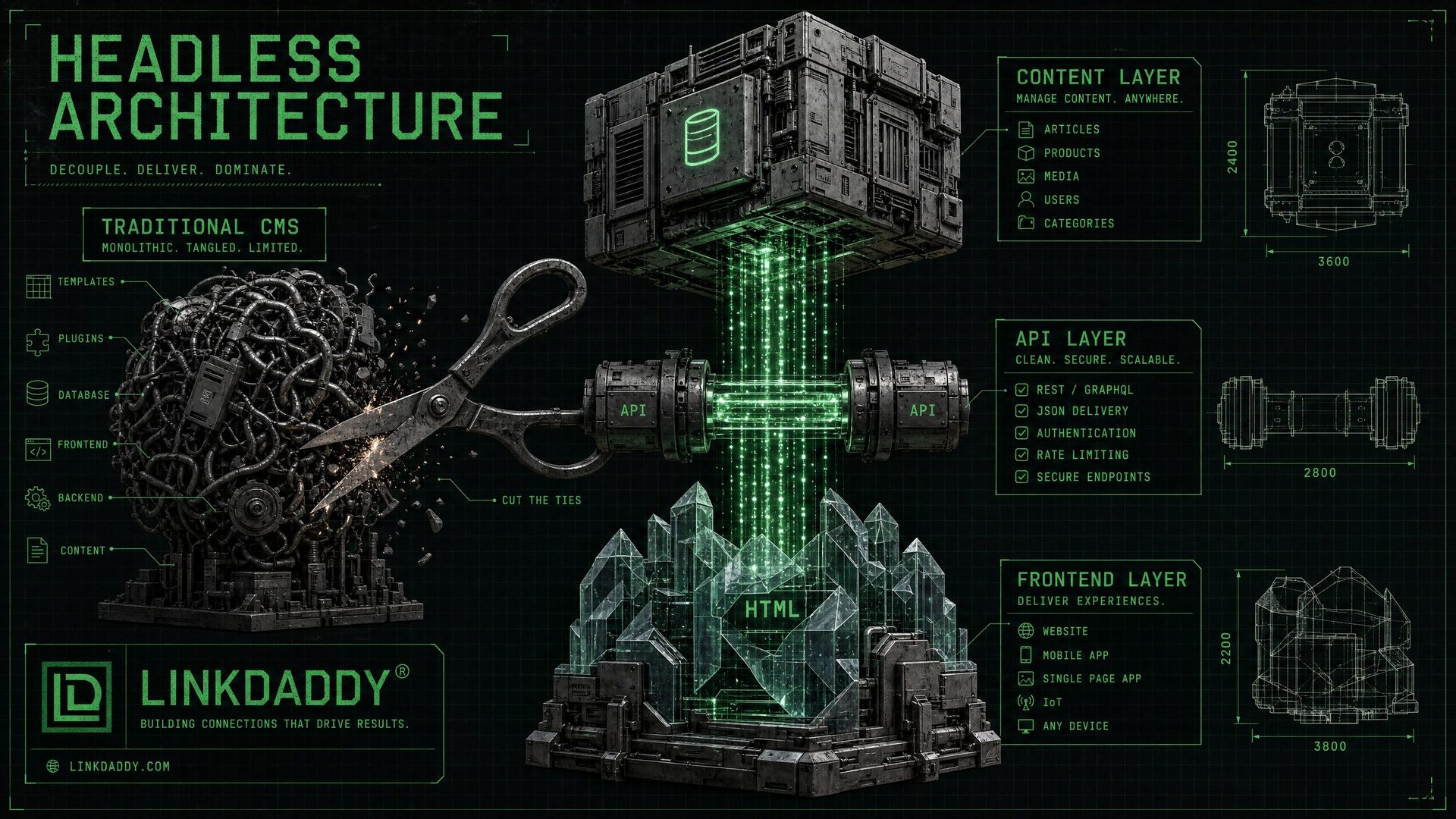
Decoupling Content from Presentation: The Monolith vs. The API
To truly understand what is a headless CMS, you must first look at the legacy architecture it replaces: the monolithic CMS, best exemplified by WordPress. In a traditional, monolithic CMS, the backend (the database and admin panel where you write content) and the frontend (the HTML, CSS, and PHP that the user sees) are tightly coupled. They are inextricably linked within the same system, running on the same server.
This monolithic approach was revolutionary in 2005, but it is a liability in 2026. It creates massive security vulnerabilities (because the database is connected to the public-facing site), severe performance bottlenecks (because the server must query the database and render the page for every single visitor), and limits your content to a single website.
A Headless CMS solves this by cutting the "head" (the frontend presentation layer) off the "body" (the backend content repository). A Headless CMS is purely a content database with an API attached. It stores your text, images, and structured data, and delivers them via an API (usually REST or GraphQL). It does not care how, where, or when that content is displayed.
The Architecture of Modern Web Infrastructure
When you decouple the content from the presentation, you unlock the ability to build a Sovereign HTML architecture. In this modern stack, the Headless CMS plays a specific, isolated role:
1. The Content Repository (The Backend)
The Headless CMS (such as Sanity, Contentful, or Strapi) acts as the single source of truth for your data. This is where your team logs in to write articles, upload images, and manage structured data. It is hosted securely, completely separate from your public website.
2. The Delivery Mechanism (The API)
The CMS exposes your content via a secure API. This means your content is now portable. It can be sent to a website, a mobile app, a smartwatch, or an AI crawler, all from the same central repository.
3. The Build Step (The Compiler)
A modern framework like Next.js acts as the compiler. During the build process, Next.js connects to the Headless CMS API, pulls down all the content, and generates pure, static HTML files. This happens before a user ever visits the site.
4. The Edge Network (The Frontend)
Those pre-rendered static HTML files are then deployed to a global edge network like Cloudflare Pages. When a user requests your site, they are served a static file from a server physically close to them, resulting in sub-500ms load times and absolute security (because there is no database to hack).
Traditional CMS vs. Headless CMS: A Structural Comparison
The decision to move to a Headless CMS is a decision to prioritize structural integrity over short-term convenience. Here is how the two paradigms compare:
| Architectural Feature | Traditional CMS (e.g., WordPress) | Headless CMS (e.g., Sanity) |
|---|---|---|
| Architecture | Tightly coupled (Monolithic). The database, code, and design are all tangled together. | Decoupled (API-driven). Content is completely separated from the presentation layer. |
| Security Profile | High risk. The database and admin login are exposed to the public internet, inviting brute-force attacks. | High security. The backend is hidden behind an API. The public only interacts with static HTML files. |
| Content Portability | Trapped. Content is formatted specifically for the website's theme and is difficult to extract. | Omnichannel. Content is stored as raw data (JSON) and can be sent to a website, app, or AI crawler simultaneously. |
| Performance (Speed) | Slow. Requires server-side processing and database queries for every single page load. | Instant. Pages are pre-rendered as static HTML and served from a global edge network. |
| Maintenance Burden | High. Requires constant plugin updates, PHP version management, and database optimization. | Zero. The CMS provider handles backend maintenance; the static frontend requires no maintenance. |
Why Headless CMS is the Foundation of Sovereign Builds
The Headless CMS is not just a technical preference — it is a strategic decision about ownership and control. When you use WordPress, Squarespace, or Wix, your content is stored in their database, on their servers, subject to their terms of service. If they change their pricing, shut down, or get hacked, your content is at risk.
With a Headless CMS, your content is stored in a neutral, API-accessible repository that you control. It can be connected to any frontend, deployed to any host, and migrated to any provider at any time. This is what digital sovereignty looks like in practice.
The FIF Protocol integrates a Headless CMS at the Infrastructure stage of every Sovereign Build. The CMS provides the content layer, while the static HTML frontend provides the performance and security layer. The result is a website that is both editable by non-technical users and structurally superior to any traditional CMS.
Top Headless CMS Platforms Compared
| Platform | Best For | Free Tier | LinkDaddy Rating |
|---|---|---|---|
| Sanity | Complex data structures, real-time collaboration | Yes (3 users) | ★★★★★ |
| Contentful | Enterprise, multi-language, large teams | Yes (limited) | ★★★★☆ |
| Strapi | Self-hosted, full control, open source | Yes (self-hosted) | ★★★★☆ |
| Ghost | Publishing, newsletters, membership | Yes (self-hosted) | ★★★★☆ |
| Prismic | Marketing sites, slice-based editing | Yes (1 user) | ★★★☆☆ |
Headless CMS and AI Visibility
One of the most underappreciated benefits of a Headless CMS architecture is its impact on AI visibility. When content is stored in a structured, API-accessible format, it is significantly easier to implement consistent, machine-readable metadata across every page.
In a traditional WordPress setup, schema markup is often added via plugins that inject inconsistent, sometimes conflicting JSON-LD. In a Headless CMS + Static HTML architecture, the schema is generated programmatically from the content model — ensuring every page has a perfectly structured, entity-linked schema stack that Answer Engines like ChatGPT and Perplexity can parse instantly.
This is the core of the FIF Protocol's Infrastructure stage: building a content architecture that is not just readable by humans, but machine-legible at the entity level, with Wikidata Q-ID references that connect your content to the global Knowledge Graph.
The Financial Argument for Headless Architecture
While the technical benefits of a Headless CMS are clear, the financial argument is often what drives enterprise adoption. Traditional CMS platforms appear cheap initially but carry massive hidden costs in the form of "technical debt."
1. The Cost of Security: A hacked WordPress site can cost thousands of dollars in emergency developer fees, lost revenue, and reputational damage. A Headless CMS eliminates the primary attack vector (the database connection), effectively reducing your security risk to zero.
2. The Cost of Performance: Amazon found that every 100ms of latency cost them 1% in sales. Traditional CMS platforms are inherently slow. By serving pre-rendered static HTML from an edge network, a Headless architecture guarantees sub-500ms load times, directly improving conversion rates and SEO rankings.
3. The Cost of Replatforming: When you outgrow a monolithic CMS, you have to rebuild the entire site from scratch. With a Headless CMS, your content is decoupled. If you want to redesign your frontend in three years, you simply build a new frontend and connect it to the existing API. Your content repository remains untouched, saving tens of thousands of dollars in migration costs.
The LinkDaddy Approach to Headless Architecture
At LinkDaddy, we do not build WordPress sites. We exclusively build Sovereign HTML architectures powered by Headless CMS platforms. This is a core requirement of the FIF Protocol.
When we architect a new build, we typically deploy Sanity as the Headless CMS. Sanity provides unparalleled flexibility for structuring complex data models, which is essential for our advanced JSON-LD schema implementations. We then use Next.js to compile that data into static HTML, and deploy the final asset to Cloudflare Pages.
This stack ensures that our clients own a digital asset that is mathematically superior to their competitors in speed, security, and machine-legibility. It is not just a website; it is a hardened node in the Knowledge Graph.
The Content Modeling Advantage
One of the most powerful features of a Headless CMS is content modeling. In WordPress, everything is forced into the paradigm of a "Post" or a "Page." In a Headless CMS, you define exactly what your content is.
If you are a real estate agency, you can create a "Property" content type with specific fields for price, square footage, and location. This structured approach ensures data consistency and makes it incredibly easy to map your content directly to JSON-LD schema, significantly boosting your Entity Salience.
Frequently Asked Questions
Is a Headless CMS hard for non-technical users?
No. Modern Headless CMS platforms have excellent, user-friendly interfaces. If you can use WordPress, you can use a Headless CMS.
Do I need a developer to use a Headless CMS?
You need a developer to set up the initial architecture and connect the API to your frontend. Once built, content editors can manage everything independently.
What are the best Headless CMS options?
Popular choices include Sanity, Contentful, Strapi, and Ghost. We select the best platform based on your specific data structure needs.
How does it improve security?
Because the CMS is decoupled, your database and admin panel are not exposed to the public internet. Hackers cannot attack what they cannot access.
Is it more expensive?
The initial build cost is higher than a basic WordPress theme, but the total cost of ownership is lower due to eliminated maintenance, security, and hosting bloat.
Build for the Future
Upgrade to a Headless CMS and secure your digital infrastructure with a Sovereign HTML Build.
Learn More